
Burmese TV Pro: APK Download, Features, and Full Review
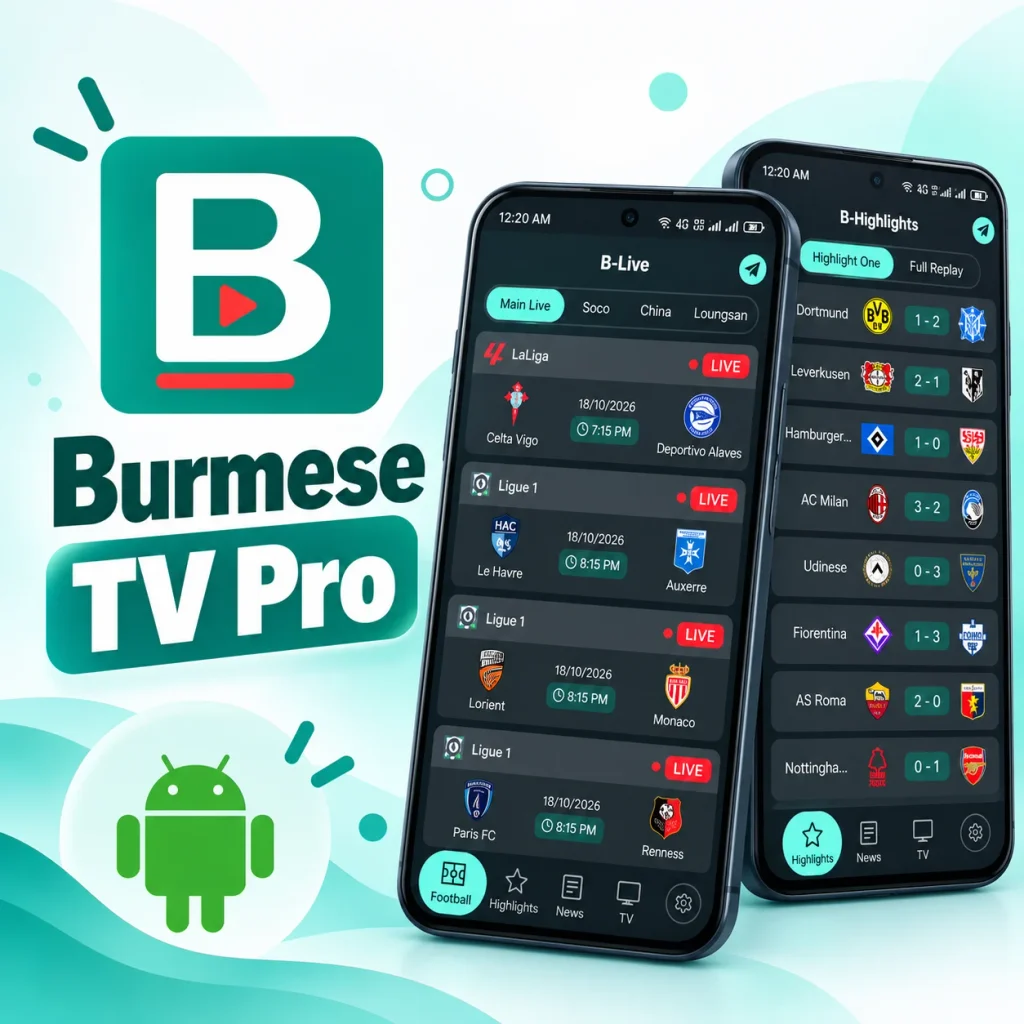
Looking for a free way to follow football in Burmese? Burmese TV Pro is an Android app that puts match lists, highlights, news, and a small TV tab in one place. Football is the main focus, and the news headlines are written in Burmese.
This guide explains every section of the app. It also covers the verified APK details, the download and install steps, the price, and the limits you should know about before you install it.
Last updated: October 2026
What Is Burmese TV Pro?
Burmese TV Pro is a free Android app made for Burmese-speaking football fans. It is built with Flutter and keeps the things fans check every day in one place. Inside the app, you get match lists sorted by league, highlights of finished games, football news written in Burmese, and a small TV section for Myanmar channels. You can also turn on alerts for live matches, highlights, and news, and change the theme and accent color.
The app is football first. It is not a full TV or movie app, so it suits you best if you mainly want match schedules, results, and news in one simple app. It is not on the Google Play Store. You install it from an APK file, which you can download from BurmeseTVPro.com. The version covered in this guide is 1.1.2, it needs Android 7.0 or higher, and ads appear between match cards.
Watch out for similar names. Other apps use names like “Burma TV Pro” or “Burmese TV: Live TV, Movies.” They have different package names, developers, and features. This guide covers only the APK named BTV-BStream.apk with the package name com.yoyar.app.
Burmese TV Pro APK Details (Latest Version)
These details come straight from the APK file.
| App Name | Burmese TV Pro |
| APK File | BTV-BStream.apk |
| Type | Android app (APK file) |
| Package Name | com.yoyar.app |
| Version | 1.1.2 |
| Version Code | 16 |
| APK Size | 60,616,312 bytes (about 57.8 MiB / 60.6 MB) |
| Minimum Android | Android 7.0 or higher (API level 24) |
| Target SDK | 36 |
| Supported Architectures | arm64-v8a, armeabi-v7a, x86_64 |
| Technology | Flutter |
| Price | Free to download, with sponsored ads |
| Main Focus | Football match lists, highlights, and news |
| Sections | Football, Highlights, News, TV, Settings |
| Menu Language | English |
| News Language | Burmese |
Since the app is not on the Google Play Store, the package name and version are the best way to confirm you have the right file.
Features Overview
Match lists (Football tab): Shows matches by league, with dates and kick-off times
Highlights (Highlights tab): Shows finished matches with scores, plus a replay list
News (News tab): Shows football stories with photos and posting times
TV (TV tab): Shows a Myanmar channels category
Alerts (Settings): Notifications for live scores, breaking news, and highlights
Video player (Built into the app): Plays video without leaving the app
Every Feature Explained
Layout and Design
The app uses a dark theme with teal highlights and rounded cards. A bar at the bottom holds four tabs: Football, Highlights, News, and TV. A round gear button on the right opens settings. Each page shows a title at the top: B-Live for Football, B-Highlights for Highlights, B-News for News, and B-TV for TV. They are the same pages with different names, so there is nothing to worry about when you see them.
Live Football Match Lists
Live Football is the man feature and the first thing you see on the Football page titled as B-Live on Burmese TV. Here you c an see the scheduled matches that you browse in four separate lists: Main Live, Soco, China, and Loungsan. Every match is shown as a card with the league, both teams, the date, the kick-off time, and a red LIVE badge. Dates use the day/month/year format, such as 18/10/2026.
The four lists give you different views of the schedule:
- Main Live groups matches under major leagues such as LaLiga, Ligue 1, and Bundesliga, with English team names and club logos.
- Soco covers many of the same games, but shows leagues as short codes like SPA D1 and FRA D1.
- China shows league and team names in Chinese, with gray “B” placeholders instead of logos.
- Loungsan leans toward smaller and regional games, including Southeast Asian tournaments and Myanmar league matches. Some listings here carry older dates.
The list names are not explained inside the app, so if a game is missing from one list, check another.
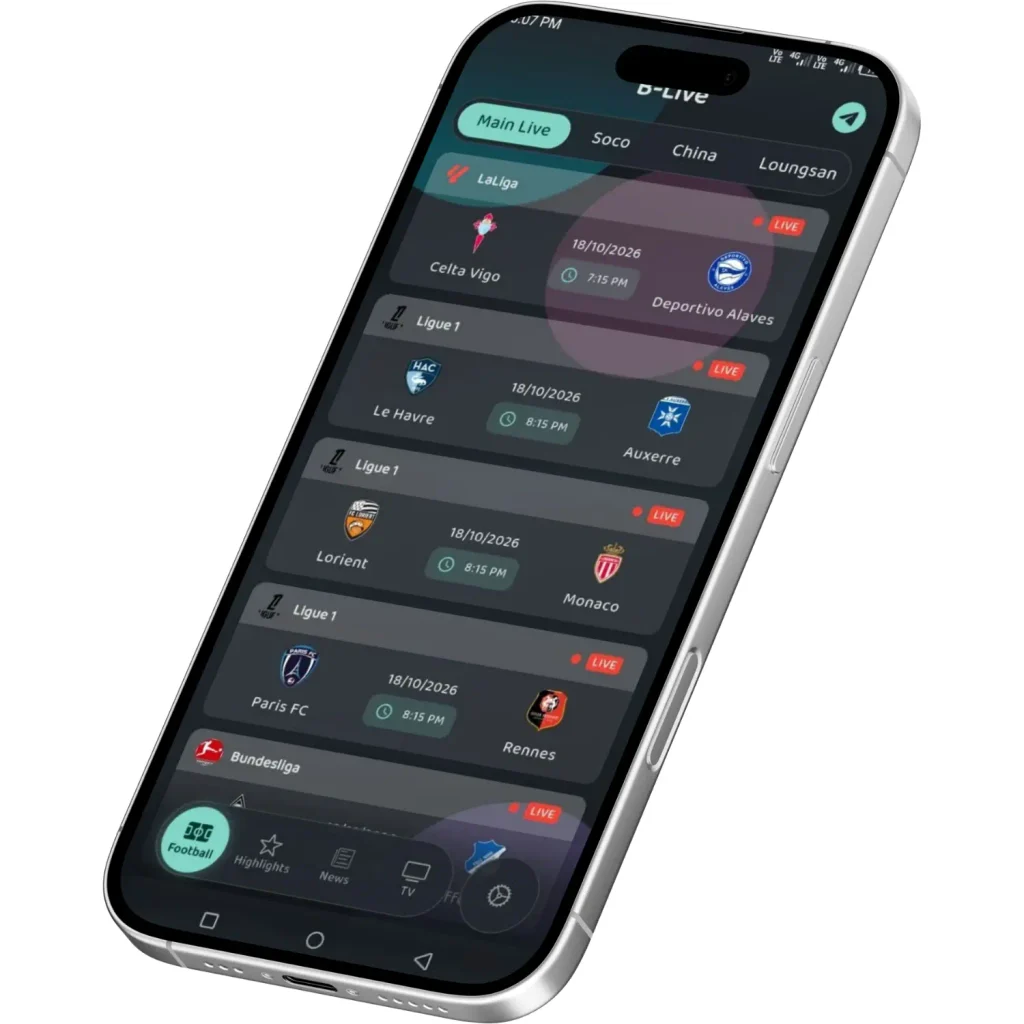
About the LIVE badge: it appears on cards in every list, even older ones, so it does not prove a match is playing now. Check the date and kick-off time against your own time zone.
Match Highlights and Replays
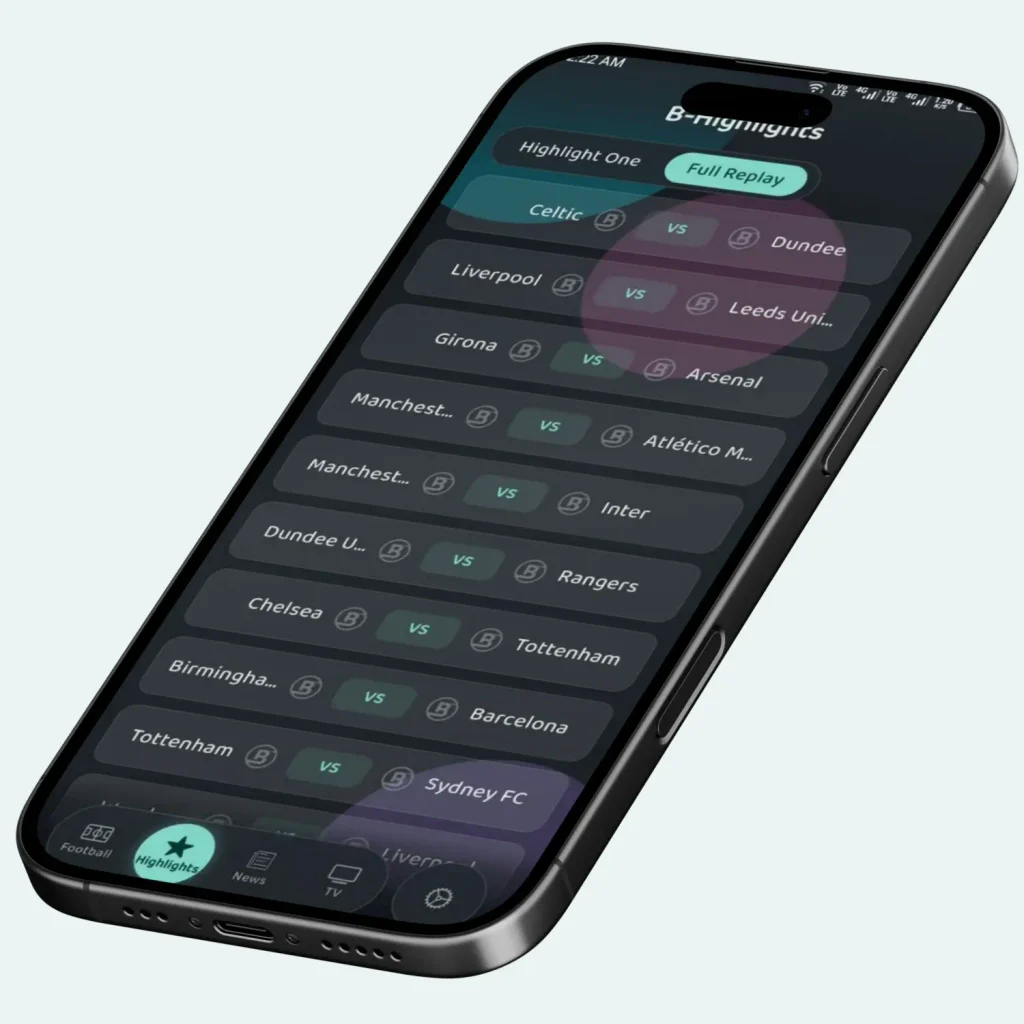
This feature helps you to catch up on the games or matches you missed. It sits on the Highlights page which is titled as B-Highlights and is split into two parts: Highlight One and Full Replay.
- Highlight One is a results list of finished matches. Each row shows both teams, their logos, and the final score in the middle, so you can see how a game ended before you open anything. The results come from major leagues such as the Bundesliga, Serie A, and the Premier League. If you want to avoid spoilers, keep in mind that the score is visible in the list itself.
- Full Replay is a separate list of matches written as “Team vs Team,” with no scores shown. The name points to longer replays, so it is the part to use when you want to rewatch a whole game instead of only the key moments.
You can also see an alert option which alerts you when the new highlights are ready. The list of matches keeps changing over time so you need to set an alert if you are waiting for your favourite matches’ highlights.
Football News Feed
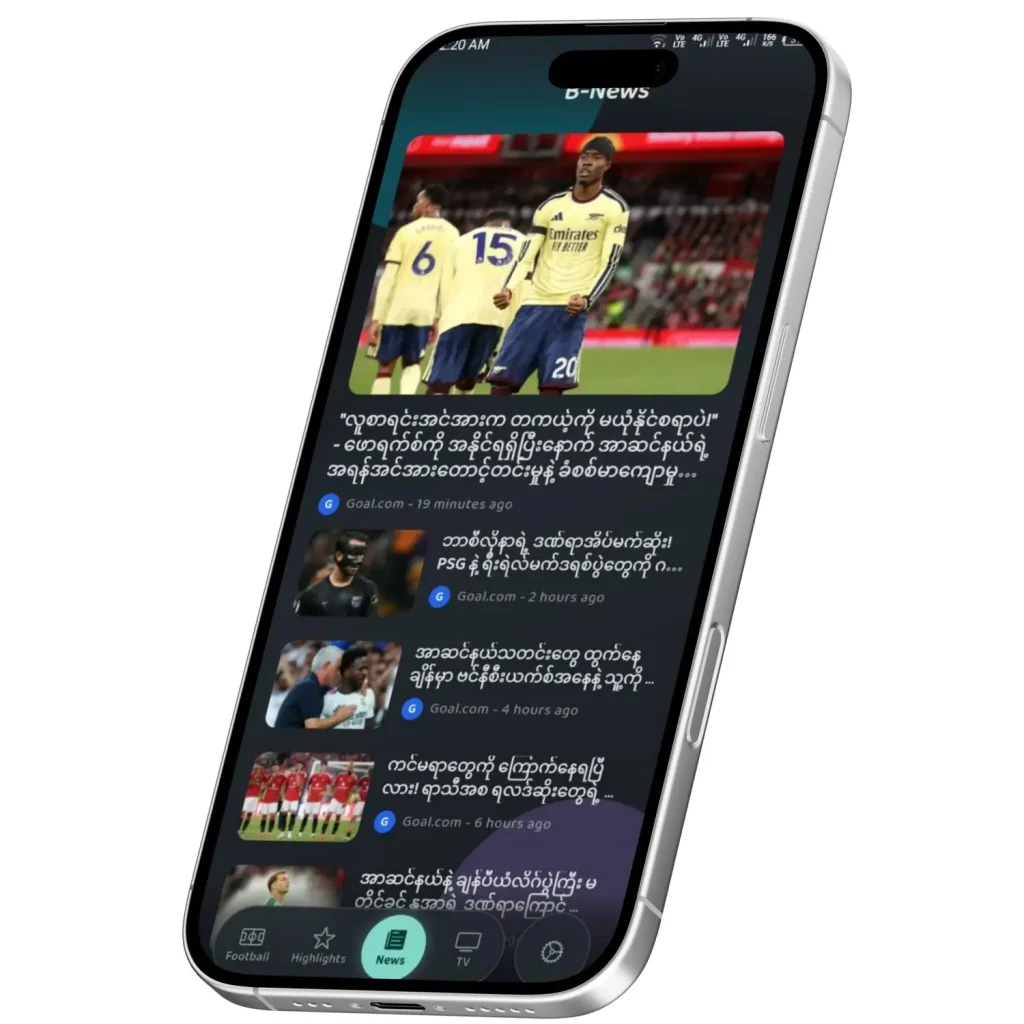
Here you see a running feed of football stories and news written for Burmese readers. You can find ot on News page which is titled as B-News works like a simple headline reader.
The feed opens with one large featured story and a photo. Below it, a list of smaller stories follows. Each item shows a thumbnail, a headline, a source label that tells you where the story comes from before you read it, and a posting time such as “19 minutes ago” or “6 hours ago.” Stories are ordered from newest to oldest, and the time stamps make it easy to tell fresh news from older items at a glance, for example to see what changed since your last visit.
The stories cover club news, match talk, and manager or transfer topics from European football. Because the headlines are in Burmese, the feature is a good fit for Burmese readers and for people abroad who want football news in their own language. It will not help if you only read English, although the page labels and menus stay in English, so the feature is still easy to find.
Myanmar TV Channels
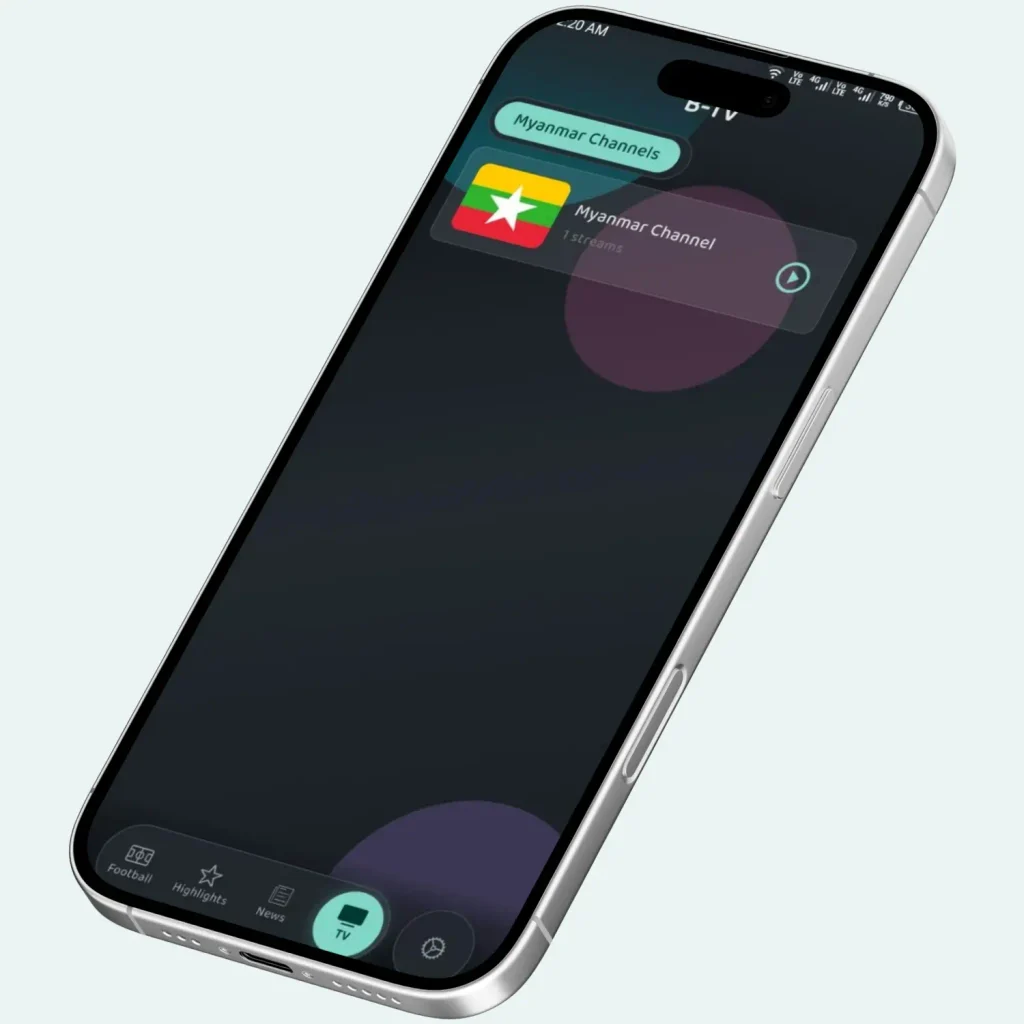
It is the live TV section on Burmese TV App which is titled as B-TV and groups channels by category. Currently you can see there is only one category, Myanmar Channels, with a single channel entry inside it.
When you enter on this page, you see a flag, a channel name, a stream count and a play button. The stream count shows how many stream links that specific entry has, which could mean backup options if one link fails. Right now, there is only one.
There is no channel guide or search box yet, so what you see on opening is the whole channels list. So this feature is small today. It is a handy shortcut if you want a Myanmar channel in the same app as your football lists, but it is not a full TV guide. If a long channel lineup matters to you, football is the better reason to install this app. Like everything else in the app, TV needs an internet connection and uses mobile data when you are not on Wi-Fi. If a stream stalls, try switching between Wi-Fi and mobile data.
Notification Alerts and Appearance Settings
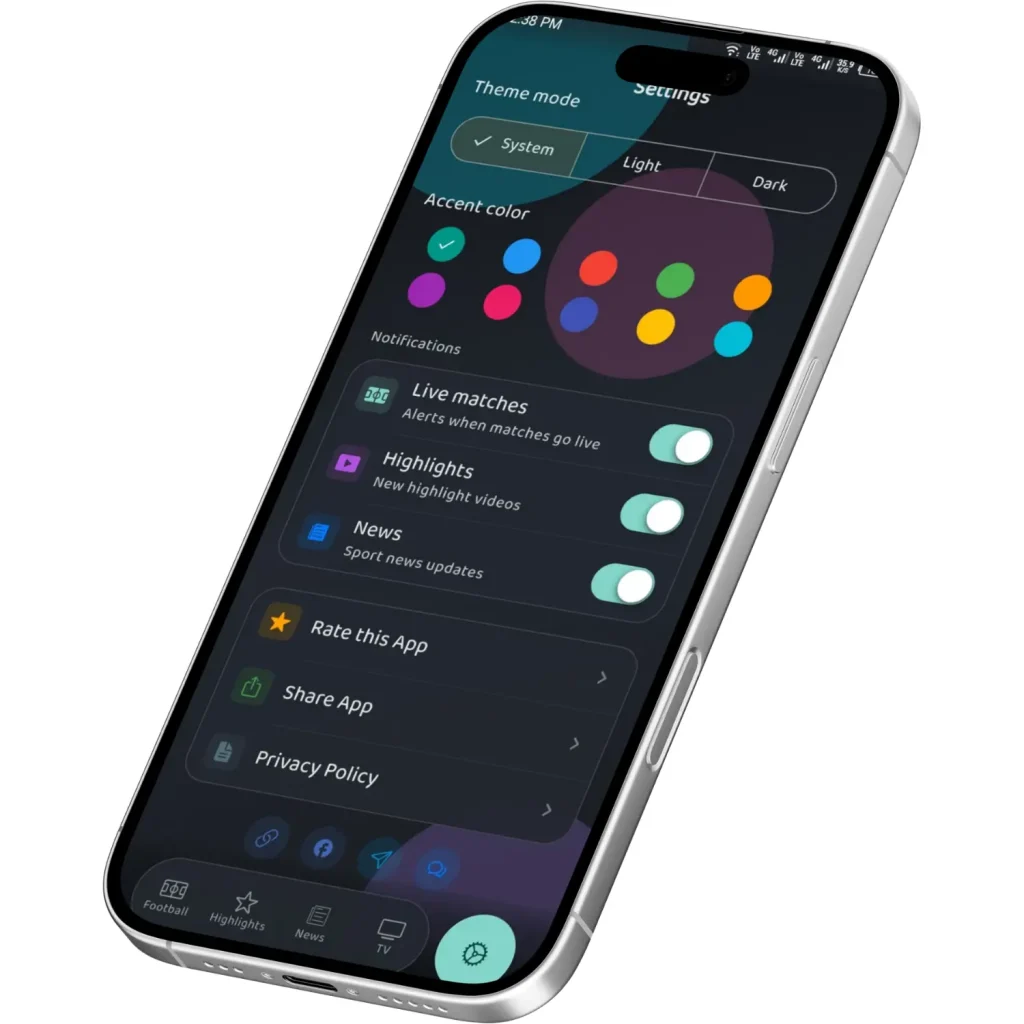
This feature controls what the app tells you and how it looks. You open it with the round gear button on the right side of the bottom bar.
There are three separate switches for notifications and alerts. Live matches notify you when the matches go live, Hihlightes inform you about the latest highlight videos and the News tells you about the sport news updates. You can keep match alerts and turn off news if it gets noisy. Alert messages in the APK also mention live scores and breaking news. This matters because the match lists show kick-off times rather than live scores, so alerts and the Highlights results are the easiest ways to follow how games are going.
There are three theme modes, which are System, Light and Dark. System follows your phone’s own setting, so the app switches with it. You can also select your favourite accent color among the 10. Below the alerts, you will find Rate this App, Share App, and Privary Policy.
Sponsored Ads
Sponsored cards appear between match cards. They are labeled “Sponsored” and carry an Install button. They usually promote other apps, such as chat or live-streaming apps. These ads are separate from the app itself. Tapping Install takes you to another app, so only tap if you want it.
How to Download Burmese TV Pro APK
- Visit BurmeseTVPro.com.
- Find the APK download section.
- Click the download button.
- Wait for the file to finish downloading.
- Follow the installation steps below.
If an older version is on your phone, uninstall it first to avoid install errors.
After installing, check that the package name is com.yoyar.app.
How to Install Burmese TV Pro APK on Android
Step 1: Allow Installation From Unknown Sources
Android blocks apps from outside the Play Store by default. Go to Settings > Apps > Special app access > Install unknown apps. Pick your browser or file manager, then turn on Allow from this source. On older phones, this setting is under Settings > Security.
Step 2: Remove Any Older Version
Uninstall the old version before installing a new one.
Step 3: Open the APK File
Find BTV-BStream.apk in your file manager or notification panel and tap it.
Step 4: Confirm the Install
Tap Install when your phone asks, then wait a few seconds.
Step 5: Open the App and Allow Notifications
Open the app and allow notifications if you want alerts for scores, news, and highlights.
How to Use Burmese TV Pro
- Open the Football tab and pick a sub-tab: Main Live, Soco, China, or Loungsan.
- Scroll through the match cards and check the date and kick-off time.
- Tap a match to open it.
- Switch to Highlights for finished matches, or Full Replay for the replay list.
- Open News for the latest football headlines in Burmese.
- Use the gear button to manage notifications.
A steady internet connection is needed for all of this.
Burmese TV Pro Android Requirements
Minimum Android Version
Android 7.0 (API 24) or higher
Target SDK
36
Architecture Support
arm64-v8a, armeabi-v7a, x86_64
Storage
About 60 MB for the APK, plus room after install
Internet
Needed for match lists, news, and video
Installation Source
Direct APK install (unknown sources must be allowed)
Phones on Android 6.0 or older are not supported.
Using a computer or an iPhone? The app is built for Android. Read our guide to Burmese TV Pro for PC for the emulator route on Windows and Mac, or our guide to Burmese TV Pro for iOS for iPhone and iPad options.
Is Burmese TV Pro Free?
Yes. The app is free to download and open, and the tabs show no purchase screen or subscription offer. Sponsored ads inside the match lists appear to be how it earns money. Video also uses mobile data when you are not on Wi-Fi.
Burmese TV Pro Latest Version and Updates
This guide covers version 1.1.2 (version code 16). The app does not update through Google Play, so check for new versions yourself:
- Visit BurmeseTVPro.com from time to time to see if a newer APK is available.
- Compare that version number with the one on your phone.
- Uninstall the old version before installing the new one.
A version number on another site may belong to a different app. Trust it only if the package name is com.yoyar.app.
Burmese TV Pro Pros and Cons
Pros
✓ Clean dark design with four simple tabs
✓ Match lists sorted by league, with dates and times
✓ Highlights page with scores and a replay list
✓ Fresh football news with posting times
✓ Free to use
✓ Works on Android 7.0 and up
Cons
✗ Not on the Google Play Store
✗ The LIVE badge shows on older cards too
✗ Tab names like Soco and Loungsan are not explained
✗ News headlines are in Burmese only
✗ Sponsored ads sit between match cards
✗ The TV tab is very small
Common Problems and Troubleshooting
The app will not install.
Allow unknown sources for the app you used to open the file, and remove any older version first.
You see an “app not installed” message.
An older copy with a different signature may still be on your phone. Uninstall it fully and try again.
A match says LIVE but nothing is playing.
The badge appears on many cards, even old ones. Check the date and kick-off time against your local time.
A tab looks empty or shows old matches.
Lists change daily. Try another sub-tab or restart the app.
Video buffers or will not start.
Switch between Wi-Fi and mobile data. Free streaming apps can have slow or missing streams for some matches, especially at busy times.
No notifications.
Allow notifications for the app in your phone settings, then check the notification options inside the app.
The app is out of date.
Visit BurmeseTVPro.com for a newer APK and uninstall the old one first.
Your phone shows a security warning.
This is normal for any APK from outside the Play Store. Check that the package name is com.yoyar.app before you install.
Burmese TV Pro Review
Burmese TV Pro does one thing and does it well: live sports streaming. It’s not trying to be a huge entertainment platform with movies and TV shows. Instead, it focuses on live matches, real-time scores, breaking news, and highlight clips. This makes it a strong choice for Burmese-speaking sports fans, especially those living abroad who want an easy way to follow matches without checking several different apps or sites. The built-in notification system for scores and news is a nice touch if you want quick updates without keeping the stream open the whole time.
Overall, Burmese TV Pro is a solid pick if you specifically want live sports coverage and match news in Burmese, and you’re comfortable installing an APK file yourself. If you’re looking for a big library of movies or TV series, this isn’t the right app for that, since that’s not what it’s built for.
App Identity: Avoiding Confusion With Similar Apps
Search results show other apps with similar names, some with different package names, versions, and content such as movies or web series. Do not mix their details with this guide.
This app is identified by:
Package name: com.yoyar.app
APK filename: BTV-BStream.apk
Version: 1.1.2 (version code 16)
If a listing shows a different package name or version, it is probably a different app.
Frequently Asked Questions (FAQ)
What is Burmese TV Pro?
It is a free Android app with football match lists, highlights, news, and a small TV tab.
Is it on the Google Play Store?
It is not available on the Google Play Store. You can download the APK from BurmeseTVPro.com.
What are Main Live, Soco, China, and Loungsan?
They are the four sub-tabs on the Football tab. Each is a separate match list with its own style of names.
Why does a match show LIVE when it is not playing?
The badge appears on cards across the lists, including old ones. Check the date and time on the card.
Are the news stories in English?
No. Headlines are in Burmese.
Does it have many TV channels?
No. The TV tab holds one category, Myanmar Channels, with a single entry.
Does it show ads?
Yes. Sponsored cards appear between match cards.
Is it free?
Yes. It is free to download and open.
What is the latest version?
This guide covers version 1.1.2. Check BurmeseTVPro.com for any newer APK.
Can I use it on a PC?
You can use it on PC by using an Android emulator. See our guide to Burmese TV Pro for PC.
Is there a version for iPhone?
The APK is made for Android. Read our guide to Burmese TV Pro for iOS for what you can do on an iPhone or iPad.
Is it safe?
We have tested it multiple times, so yes, it is 100% safe.
Download Burmese TV Pro APK
Get the latest version 1.1.2 and watch live football streams on your Android phone.